Note: This post contains affiliate links. If you make a purchase through these links, I may earn a small commission at no extra cost to you. For more information, visit Terms & Conditions. Thank you!

I taught myself how to build websites since like…2015.
I had two travel blogging sites (that are no longer in existence) that I built on WordPress & Bluehost, and other one-page sites I built on Carrd.
(Does coding your MySpace page count as website building? Uh oh, I may have just aged myself there!)
Though I never had formal training in web design, I trial-and-errored my way through many sites and got them to look halfway decent.
Soon after graduating college, I created this very site you’re reading. 😁
This site was always hosted on Squarespace. Tbh, after long WordPress days in the 2010s, I fell in love with how intuitive Squarespace is.
It’s SEO-ready and easy enough to use.
There was just one problem…
My site looked SO basic. Like, I-don’t-wanna-share-my-site basic.
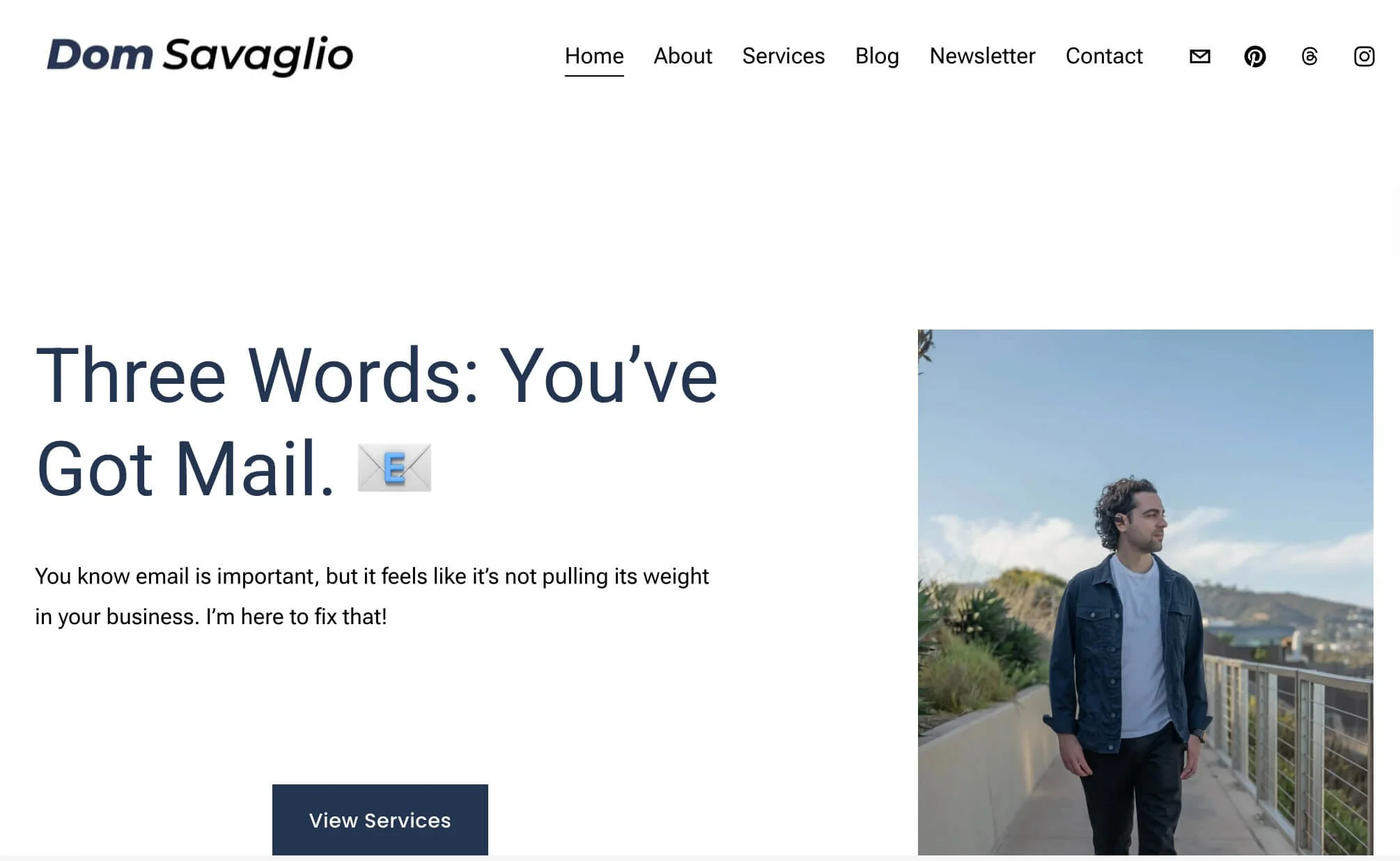
Literally can’t stop sighing
I’m an email marketer by trade, but I knew a high-converting, nice-looking website would be important for me.
During this time, I swear all I saw online were these beautiful websites of other freelancers like me. But why did mine look so blah?!
Then one day, I stumbled upon GoLiveHQ (“Go Live”), a premium Squarespace template shop.
I had a really positive experience using their templates, and I want to share why! It would always drive me crazy trying to figure out how people got their sites looking great, so I want to share my experiences with you.
This post will cover how I found out about GoLiveHQ, my experience building my site, and why I recommend their Squarespace website templates!
But First, What Is GoLiveHQ?
GoLiveHQ (usually called “GoLive”) is a premium Squarespace template shop and web design agency. I was searching for a Squarespace template and that’s how I found GoLive.
Is GoLive worth it? 🤔
To me, it was 100%. It provided a skill I did not have (web design), made it easy to implement, and was at a price I could afford.
Will GoLive Website Templates Fit My Business?
GoLive Squarespace Templates suit many kinds of entrepreneurial & creative businesses.
They have templates specifically made for service-based businesses, coaches, non-profits, content creators, and more!
And although the templates are assigned to one of the above categories, it doesn’t mean your business has to fit the category perfectly.

But of course, if you don’t plan to launch on Squarespace, GoLive templates won’t be a fit. GoLive also does not have free templates.
Why I Chose a GoLive Squarespace Template
#1: Ease of Use
As I mentioned, I struggle-bused my way through websites in the past. Once I finally committed to Squarespace, I needed an easy way to make my site look like it wasn’t Squarespace’s basic, built-in templates.
Building my site with GoLive was so easy. They give you a mini course that helps you choose your site colors, write high-converting copy, and get all the technical/SEO stuff set up.
No joke, I truly had a pep in my step after going through the course because I was getting it all done so fast…and my site finally looked right!!
If ease of use is important to you, GoLive is the way to go live. 😀
#2: GoLive’s Price Fits My Budget
GoLive’s templates cost $299 (or $269 with code DOMENIC10 🙂↕️), which felt like a worthwhile investment for me.
I didn’t have thousands to spend on a web designer, or more than $300 for a premium template. Getting your site up and running for less than $300 felt more than doable!
#3: GoLive Templates Are Built to Convert
The templates aren't only easy to customize; they’re also laid out strategically to convert.
When a website is easy to navigate and speaks directly to your target audience, visitors are more likely to become paying customers!
Within the template, there are prompts suggesting what you might write in your headlines and body paragraphs. Which leads me to my next point…
#4: Copywriting Support
There is copywriting support within the template, but also, GoLive gives you a free course to help you write your site.
Not only does the course include how to set up the backend stuff in Squarespace, but it also helps you actually write your site!
So for $269 (with my link and code DOMENIC10) you get a template, copywriting help, and a mini course. Not too shabby!
#5: Amazing Customer Service
After I launched my site, the GoLive team sent me an email congratulating me. If you give them feedback, they’ll also review your site for free. They sent me a Loom with some helpful tips to enhance my site even more, which I appreciated!
GoLive Template Promo Code
All in all, I couldn’t be happier with my choice to purchase a GoLive Squarespace template. If you’re looking to get your Squarespace site live fast without looking basic, I couldn’t recommend GoLive enough!
If you’re ready, head over to their site and use the code “DOMENIC10” for 10% off your template.
I can’t wait for your site to launch! Email me the link when your site’s live…I’d love to see it! ☺️
FREQUENTLY ASKED QUESTIONS
Your GoLiveHQ questions, answered!
How Long Did It Take to Build Your Site with GoLive?
It took me about 2.5 weeks to design my site. GoLive gives you a mini course to get your site set up in as little time as a week, but I didn’t have a ton of time to dedicate. Still - 2.5 weeks building a site is short!
Does GoLiveHQ Have a Promo Code?
Yes! With my code ‘DOMENIC10’ you can take 10% off your template. (This is an affiliate link. Thank you for supporting my business!)
Does GoLiveHQ Do Full Web Design?
Yes, they do!
Which GoLive Template Does Your Site Use?
I used the High Speed template. GoLive recommends templates based on what type of business you are, and this one fit mine the best!
Do I Need a Squarespace Account to Use a GoLiveHQ template?
You need a Squarespace account, but you do not need a plan. You’ll be able to design your full site, and then GoLive will walk you through how to get it live (it’s in the name 😁). As of this writing, GoLive gives you a discount code to use for your Squarespace plan!
What If I Have Trouble Choosing a Template?
GoLive has a questionnaire to match you to one. It’s a good place to start if you can’t decide or don’t know what will suit your business best!
In case we haven’t met…
👋 I’m Dom—an email marketing strategist who believes email can be simple & profitable for your business!
If you enjoyed this post or got something out of it, here are other ways we can connect:
📧 Subscribe to my newsletter. I send a short email every Tuesday to help you build an email marketing strategy you can feel good about.
👉 View my services. Are you my next client?!
📚 Read the rest of the blog. Here, you’ll find in-depth posts about email, marketing, business, and more!
🛠️ Check out the tools & resources I use in my business. I keep this page updated with the tools I use and recommend (some with full reviews!). If you’re looking for a solution for your business, it’s worth perusing!
☕️ Buy Me a Coffee. If you found this post helpful and feel like saying thanks, you can leave a little tip. Never expected, but always appreciated! ❤️